In today’s fast-paced digital economy, waiting weeks for government documentation is a thing of the past. Whether you are opening a new bank account, investing in the stock market, or starting a new job, the Instant PAN Card service has revolutionized how Indians access their Permanent Account Number. Gone are the days of physical forms and long queues; the Income Tax Department now allows eligible citizens to generate a valid PAN digitally within minutes.
In this comprehensive guide, we will walk you through the instant pan card apply process, eligibility criteria, and how to download your document effortlessly in 2026.
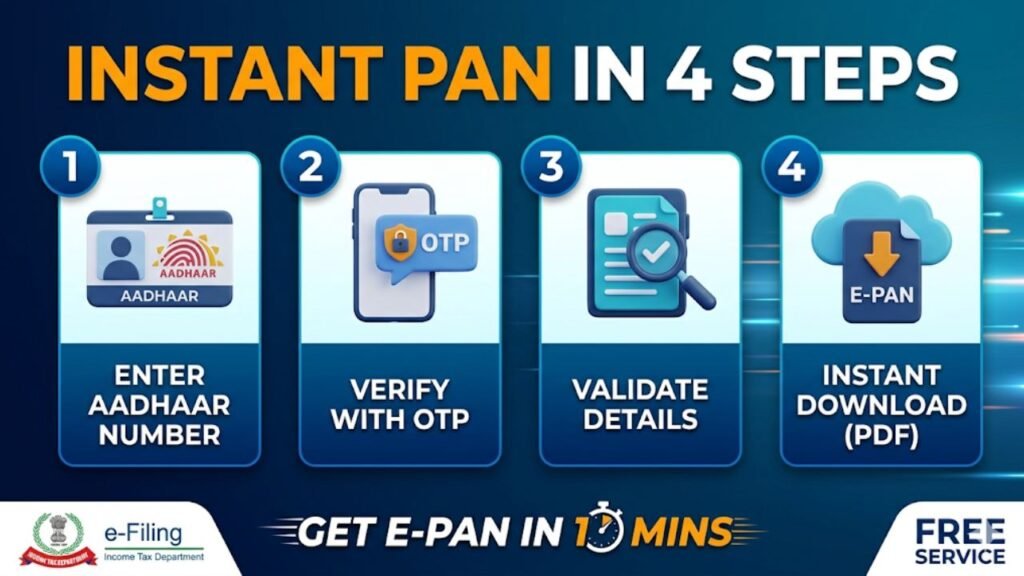
What is an Instant PAN Card?
An Instant PAN Card (or e-PAN) is a digitally signed identification document issued in near real-time by the Income Tax Department. Unlike the traditional method that takes 15–20 days, this process typically takes less than 10 minutes.
The instant e pan card carries the exact same legal weight as the physical plastic card. It is a paperless, contactless, and highly secure process that leverages your aadhaar based instant pan system to verify your identity instantly through e-KYC.
Eligibility for Instant PAN Card Application
Before you begin your instant pan card application, ensure you meet the following requirements set by the Income Tax Department:
- Individual Status: This facility is only for individual taxpayers. It is not available for HUFs, Firms, or Companies.
- Fresh Application: You must have never been allotted a PAN before. Possessing more than one PAN is illegal and attracts a penalty of ₹10,000.
- Aadhaar Linkage: You must have a valid 12-digit Aadhaar number.
- Active Mobile Number: Your mobile number must be linked to your Aadhaar to receive the necessary OTP for verification.
- Complete Profile: Your Aadhaar must display your full Date of Birth (DD-MM-YYYY), not just the birth year.
- Age Requirement: The applicant must not be a minor on the date of application.
Benefits of Choosing an Instant e Pan Card
| Feature | Instant e Pan Card | Traditional PAN Card |
| Processing Time | ~10 Minutes | 15 – 20 Days |
| Cost | Free Instant PAN Card Apply Online | ₹107 (Domestic) |
| Documentation | No Physical Documents | Physical Copies Required |
| Validity | Digitally Signed & 100% Valid | 100% Valid |
| Ease of Use | Mobile/Email Delivery | Postal Delivery |
Documents Required for Instant PAN through Aadhaar
The beauty of the instant pan through aadhaar process is the lack of “paperwork.” Since it uses your existing biometric data and identity verified by UIDAI, you only need:
- Your 12-digit Aadhaar Number.
- The Mobile Phone currently linked to your Aadhaar.
- An active Email ID (Optional, but highly recommended for receiving the digital copy).
Step-by-Step Guide: How to Apply for Instant PAN Card Online
Ready to get your tax ID? Follow these precise steps to complete your income tax instant pan card process on the official e-Filing portal:
Step 1: Access the e-Filing Portal
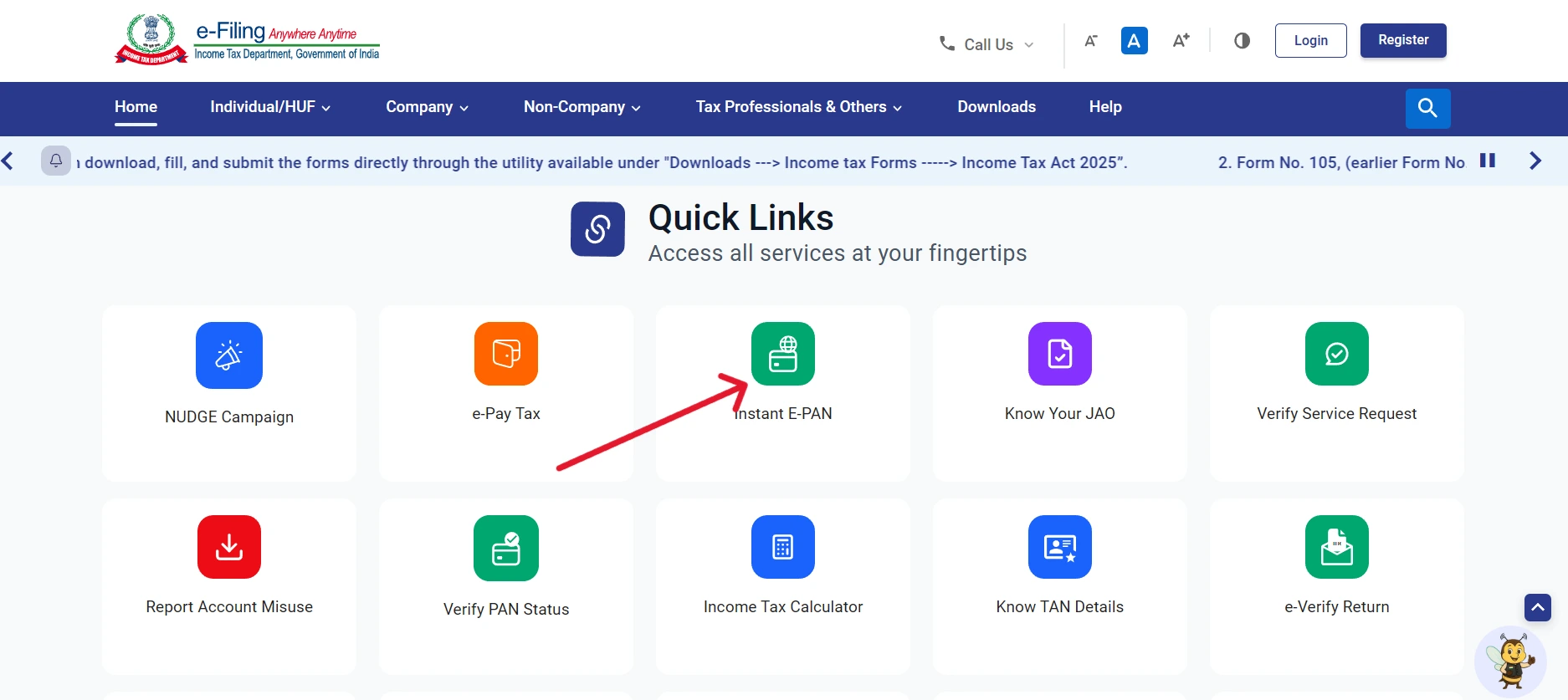
Visit the official Income Tax e-Filing Portal. On the homepage, look for the ‘Quick Links’ section.
Step 2: Navigate to Instant e Pan Card
Click on the ‘Instant e-PAN’ button. This will redirect you to the specialized application page.
Step 3: Start a New Application
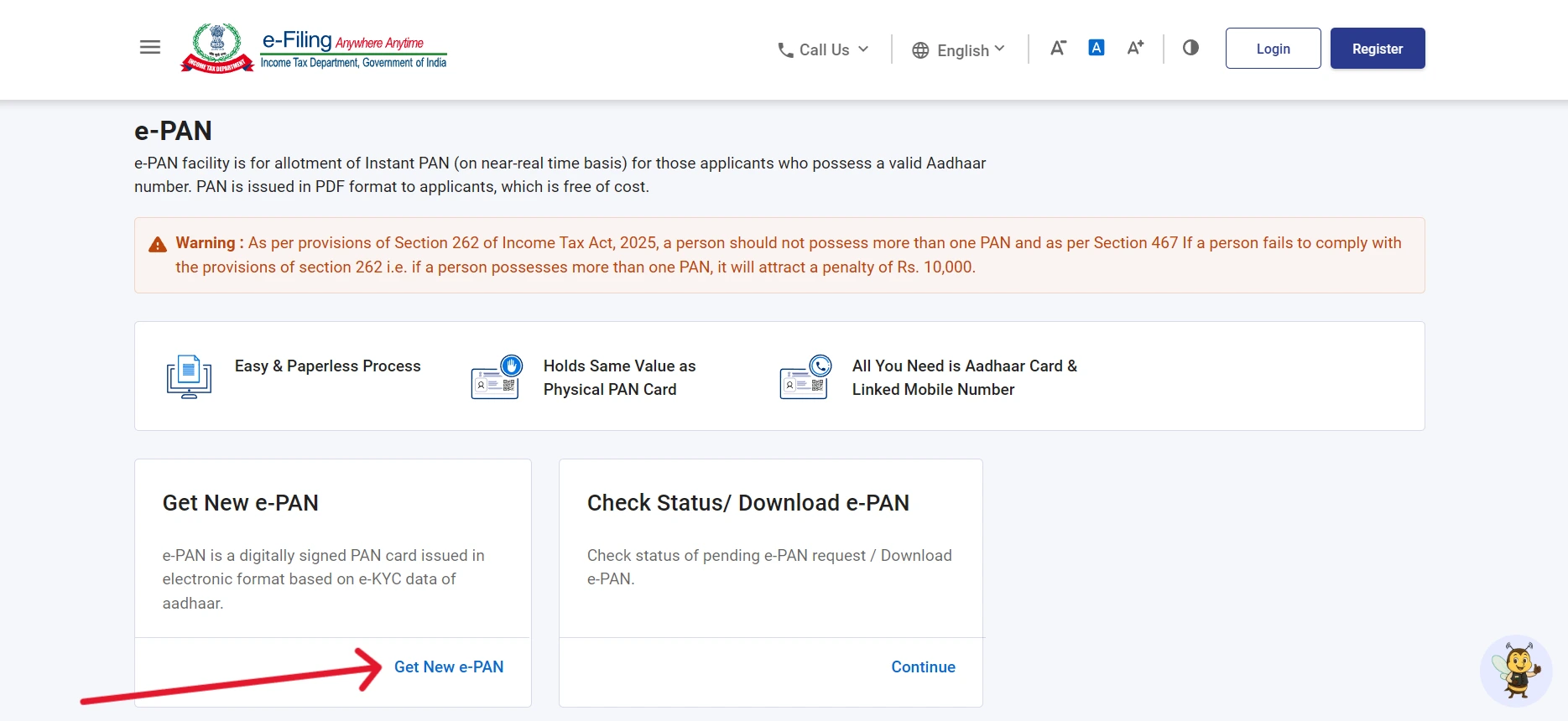
Select the option ‘Get New e-PAN’.
Step 4: Aadhaar Validation
Enter your Aadhaar number carefully. You will be asked to confirm a disclaimer stating that you do not already possess a PAN and that you agree to share your Aadhaar details with the Income Tax Department.
Step 5: OTP Authentication
A 6-digit OTP will be sent to your Aadhaar-linked mobile number. Enter it promptly (the OTP is usually valid for 15 minutes).
Step 6: Review & Submit
The system will pull your details (Name, Photo, Address, DOB) from the Aadhaar database. Review them for accuracy. Once confirmed, submit the request. You will receive an Acknowledgement Number keep this safe for instant pan card status check purposes.
Instant PAN Card Download: Getting Your PDF
Once your application is processed, you won’t receive a physical card in the mail automatically. You must perform an instant e-PAN download pdf from the portal.
How to Download:
- Go back to the Instant e-PAN section on the e-Filing website.
- Select ‘Check Status/ Download PAN’.
- Enter your Aadhaar number and the OTP received on your phone.
- If the status shows “Successful,” click on ‘Download e-PAN’.
Pro Tip: The downloaded PDF is password protected. The password is your Date of Birth in the format DDMMYYYY. For example, if your birthday is January 1st, 1990, your password will be 01011990.
Instant PAN Card Status Check: What Do the Results Mean?
After submitting your instant pan card application, you can monitor the progress. Usually, the status is updated within minutes, but occasionally it may take longer.
- In Progress: Your details are being verified with UIDAI. Check back in 30 minutes.
- Generated: Your PAN is ready! You can now proceed with the instant pan card download.
- Failed: This usually happens if there is a data mismatch (like a name spelling difference) between Aadhaar and the Income Tax records.
Common Problems and Quick Solutions
Even with a streamlined system, you might encounter hiccups during the instant pan card apply process. Here is how to fix them:
- OTP Not Received: This is the most common issue. Ensure your mobile number is correctly updated in the Aadhaar database. If you don’t receive it, wait 60 seconds and click “Resend OTP.”
- Aadhaar-PAN Linkage Error: If you see a message saying your Aadhaar is already linked, it means you likely already have a PAN. You cannot apply for a new one. Instead, use the “Know Your PAN” facility.
- Data Mismatch: If your name on Aadhaar doesn’t match the Income Tax Department’s standards, you must first update your details at an Aadhaar Enrollment Center before reapplying.
Getting a Physical PAN Card After e-PAN
While the instant e pan card is sufficient for all digital and physical needs, some users prefer having a plastic PVC card in their wallet.
Once your e-PAN is generated, you can visit the Protean (formerly NSDL) or UTIITSL website and select the ‘Reprint PAN Card’ option. By paying a nominal fee of ₹50, a physical card will be printed and dispatched to your Aadhaar-registered address via speed post.
Frequently Asked Questions (FAQs)
1. How to get an Instant PAN Card online?
You can get an Instant PAN Card online through the Income Tax Department’s e-filing portal using your Aadhaar number linked with a mobile number. Complete Aadhaar OTP verification, submit the request, and your e-PAN can be generated instantly if eligible.
2. Is Instant PAN Card free?
Yes, the Instant e-PAN facility is generally provided free through the official Income Tax portal.
3. How much time does it take to get Instant PAN?
In many cases, e-PAN is generated within minutes, though sometimes it may take a little longer depending on verification.
4. How can I download my Instant e-PAN?
You can download your e-PAN from the Income Tax e-filing portal using the “Check Status/Download PAN” option and OTP verification.
5. Can I get a physical PAN card after Instant PAN?
Instant PAN primarily provides e-PAN (digital PAN). For a physical card, you may need to follow the relevant PAN card request process.
Final Thoughts on the Instant PAN Card
The Instant PAN Card facility in 2026 represents the pinnacle of digital governance in India. It empowers citizens to gain financial identity in minutes rather than weeks. By following the instant pan card apply steps outlined above, you can secure your e-PAN today at no cost.
Check TS MeeSeva Application Status online using your application number or transaction ID. Visit the MeeSeva portal, enter your details, and track your application progress in real time quickly and easily with this simple step-by-step guide.